Filip Hráček / text /
Using git worktree for A.I.-assisted coding
As I’m trying to figure out the best way coding AI can help me, I've found one combination of tools that seems to make a lot of sense: agent workspaces and git worktree.
I’m going to document my current approach here, mostly for my own benefit. (This document started as a personal Obsidian note.) I tend to forget git invocations on a regular basis.
If you don’t know what git worktree is: it lets you put a branch’s content into a directory on your disk. So you can git worktree add some_branch some_directory, and then you can cd some_directory and work there as if it was a separate clone. Unlike a separate git clone, though, worktrees share the same .git (no database duplication), have synchronized state (you don’t need to remember to git fetch in both) and the branches still work like in a single repo (because they are) so things like rebase, merge and cherry-pick are immediate.
Similarly, if you don’t know what AI agent workspaces are, it’s a feature where you can let an AI work on multiple projects at once from a single UI without trampling over each other. Google’s Antigravity IDE has a nice implementation of this but I assume it’s not unique to that editor alone.
Here’s my workflow.
Create “AI-controlled” branches
Don’t let the AI work on main. That branch is for humans only!
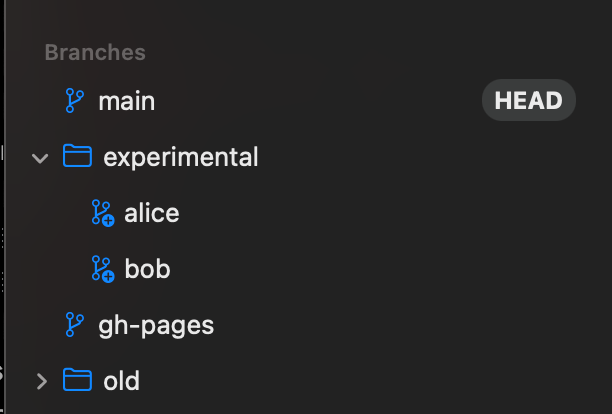
Instead, create two new branches: experimental/alice and experimental/bob.
Why alice and bob? Initially, I used a and b but a single character is easy to miss. I thought about alpha, beta, gamma but Greek letters are overloaded terms (“alpha branch” etc.) Finally, it’s nice to think about the AI in this way. “Oh, Alice is still working on the rename.” I think it rolls down the tongue better than something like llm_a or foo.
The reason I’m sticking with two agents (Alice & Bob) and not more is that, so far, the AI is fast enough that it rarely actively works on both branches at once. Most of the time, it’s me who’s the bottleneck as I review Alice’s code or compose the requirements for the next task.
Use git worktree
To put the two new branches on disk:
git worktree experimental/alice experimental/alice
git worktree experimental/bob experimental/bob
This creates the two new directories: experimental/alice and experimental/bob. I like the directories' paths to match the branch names. But of course you could do git worktree experimental/alice some_other_dir.
I put these directories inside the project. So I have something like this:
.
├── android
├── experimental
│   ├── alice
│   └── bob
├── ios
├── lib
│   └── main.dart
├── test
├── tool
├── web
├── pubspec.lock
├── pubspec.yaml
└── README.md
That way, my projects directory (~/dev in my case) is not polluted by a bunch of branches. But of course, you don’t need to do this, and it seems that at least some other people go with something like:
~
└── src
    ├── my_project
    ├── my_project.alice
    └── my_project.bob
Anyway, if you do go with my approach and put the worktrees inside the project, you have to:
- make sure you .gitignore them
- make sure you ignore them in your static analysis (e.g. inside
analysis_options.yaml) - make sure you ignore them in your IDE (e.g. Mark as ignored)
Create AI workspaces
Now, you have directories you can point your AI to.
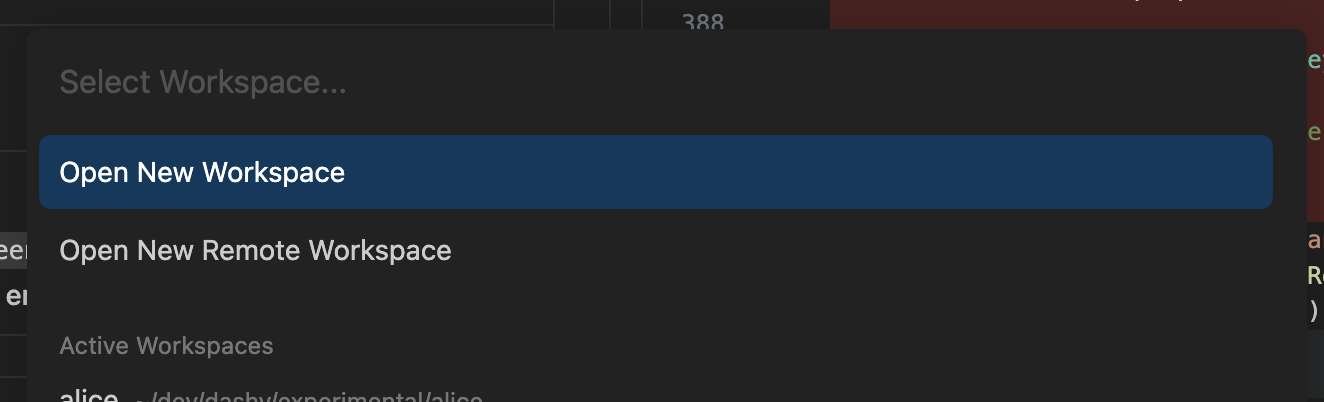
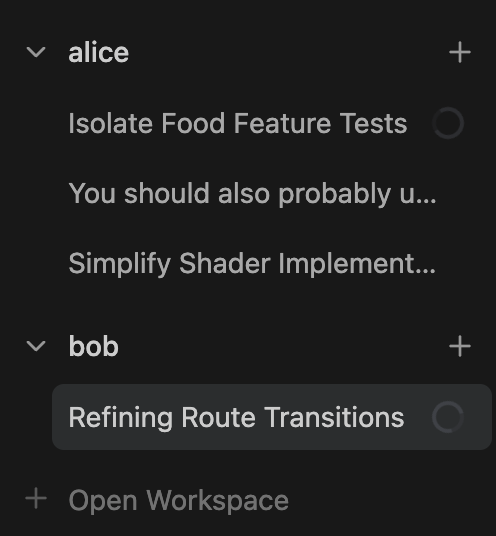
In Google Antigravity, you can go to Agent Manager, click Open Workspace in the left pane, and open one of the two directories you just created via git worktree. Do the same for both alice and bob. The workspace will automatically be named after the directory name, so that’s nice: you’ll have workspace “alice” and workspace “bob”.
Give the AI something to do
Now you can make sure you have a workspace selected, and give it a task. As soon as the AI is working (and assuming you have a permissive mode selected so that the AI doesn’t ask you about everything), you can go and do something else.
For example, you can head over to the “bob” workspace, and ask it to do something else on the same codebase. Obviously, you want to find a task that doesn’t conflict too much with what Alice is working on at the moment, so that you don’t have a merge headache to deal with later. Finding such tasks is an art in itself, but that’s outside the scope of this article and, frankly, isn’t different from a regular (human) team lead job.
I like to have the root of the project for myself. I can work on things that I wouldn’t let an agent do, experiment with UI, write docs, etc.
Reviewing the agent’s work
When the agent’s done, your IDE will show a notification. That’s when you go back to the agent and have the option to review their work.
Antigravity gives you a decent UI for reviewing changes and, more importantly, adding comments to them (you can add a comment to a specific line like you would with a GitHub or GitLab PR).

Since the branch is on your disk, nothing prevents you from cd-ing into the directory and running tests, making your own changes or testing the app with something like flutter run -d macos.
You can keep asking the AI to make changes until you’re happy. At that point, you can simply commit the changes (Antigravity has that option right in the Review pane).

Syncing
After that, you simply merge Alice’s changes to your main branch (in the root of the project, git merge experimental/alice).
Depending on where you are with Bob at that point, you have options. For example:
- If Bob isn’t doing anything and you just want him to start from the current
main, you can justcdinto his subdirectory and rungit reset --hard main.- You can do this without changing directories with
git -C experimental/bob reset --hard main. The-Cflag means simply “run this command as if you were in that directory”. - You don’t need to
reset --hardall the time, of course. If you prefer,git merge mainwill also work.
- You can do this without changing directories with
- If Bob is in the middle of a task but stopped (for a review), and you want to merge Alice’s work early, you can of course run
git merge main. - I’m guessing you can even ask Bob to merge from
mainbut I haven’t tried that yet.
Impressions
Coding with AI is definitely not in my comfort zone. I like deep work, and chasing two very fast (and sometimes infuriatingly dumb) LLM agents is incompatible with deep work. Notifications abound. There’s also the strange kind of FOMO when you know the AIs could be productive at this point but you don’t have anything for them to work on yet (for example, you’re currently in the flow and working on something else). But again, this is not that different from becoming a team lead or taking on a more managerial role. Except working with AI is way less stressful because it’s not a human’s time you’re wasting.
For what it’s worth, working like this can feel incredibly productive. Especially at times when you get both AIs working in parallel (even though this never takes too long in my case).
At the same time, the usual caveats of AI-assisted coding persist. AI makes dumb mistakes and has the tendency of chasing its own tail as the project gets more complex. I think it’ll take time for me to really get a feel for when to switch from “Individual Contributor mode” to “Team Lead of LLMs mode” and when to switch back.
I think I will always keep at least a portion of my week for deep work, where I don’t need to chat with AIs and deal with constant notifications.
That said, when it does make sense to give work to AI, I think I prefer multitasking it with the help of git worktrees. When you have a team of 2 AIs, you basically never find yourself just watching a progress indicator. Which means you have so much less opportunity to shift focus, go grab a cup of coffee etc. You can actually get in some sort of flow while using AI — which is nice.
— Filip Hráček
January 2026

Filip is a programming buff with formal training in journalism. He worked in Silicon Valley, now he’s based in Prague. He builds games, teaches programming, explains things, and creates silly software experiments.
His main project these days is GIANT ROBOT GAME (Steam link).
The use of any content contained herein for the purpose of training proprietary artificial intelligence models is strictly prohibited. Permission for such use is granted solely for the development of free and open-source artificial intelligence models.