Filip Hráček / text /
Playing classic Windows games from 1996-2006
I’m not much of a retro gamer but I do enjoy an occasional old game. I don’t think it’s nostalgia — for example, I like playing old titles that I didn't play as a kid.
There are a few reasons why picking up an old game is often better than buying a new one:
- There are a lot of them. The past contains about 3 thousand AAA games, while the present gets about 50 AAA releases a year. (See below about indie games.)
- It’s easier to pick. Old games have been played and reviewed for decades, and some of them stood the test of time. Pick a genre, and you’ll probably find a Reddit thread where fans make a good argument that some 20 year old title is the definitive, crystalized form of the genre.
- Different game development eras favor different genres. As the game market changes, genres phase in and out of profitability. As technology marches on, genres get viable on one end, and become unnecessarily complicated on the other end. I wrote about this previously.
- Last but not least, playing old games is generally a lot cheaper than playing new ones. Both in software (old games are often just a few bucks) and hardware (old computers can be emulated for cheap).
Yes, there are more indie games today than ever before. It’s good to notice, though, that these indie games are often more inspired by old games than by current games. For example, an indie game like Slay the Spire has more in common with 1990s' (J)RPGs than with current RPGs. Many an indie game takes what was fun in an old game, and makes it better while also adding modern conveniences. But not all genres get the indie treatment. And those that do sometimes get a very narrow reimagining. For example, it’s my opinion that Civilization 1 is still the king in its genre and complexity bracket. The newest Civs are so complicated that they effectively become a whole different genre, and indie games like Polytopia are massively simplified, mobile-first reimaginings. That is to say, indie games can sometimes resurrect an old genre in a way that fully replaces the old game -- but not always.
Another reason why indie games can’t always compete with old titles is right there in the name: they’re independent studios and so they don’t have the budget of major ones. There’s no indie Star Trek or Star Wars title because indie studios don’t have the money or clout for getting that IP. And while some elements of game production are significantly cheaper nowadays than they were in the past, others remain expensive. (For example, really good actors are about as rare today as they were in the 1990s.) So you get lower production values.
Anyway, let’s go back to old games, then.
The 1996-2006 gap
On one end, we have games that were written for hardware so old that it is easy to emulate in software. We've had NES emulators for decades now, because running a 1.79 MHz 8-bit VM on a multi-GHz multi-core monster is not hard. Nowadays, you can fully emulate up to a 1996-era Pentium II (Intel 440FX + PIIX), though that’s far from trivial.
On the other end, we have games that were released after roughly 2006, for relatively modern graphics APIs (like Direct X 11) and without things like SafeDisc. These can be run natively on modern Windows, and they work relatively seamlessly with translation layers like Proton or Wine.
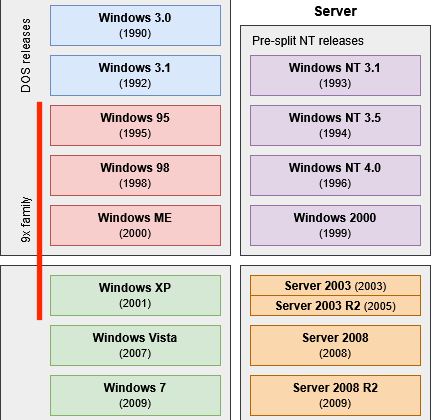
That leaves us with the gap: games built for Windows 95, 98 and XP, so roughly between 1996 and 2006. These rely on a mess of obsolete APIs from a Wild West era of things like 3dfx, Voodoo, SVGA drivers, DirectDraw, and 16-bit installers. While there’s some progress on the translation layer, my experience has been pretty dismal. Games from this era either don’t work, or they need a lot of brittle patching and then sometimes still glitch or crash. And I’m not even talking about SafeDisc, the discontinued DRM scheme that bricks many original game discs on anything newer than WinXP.
The other approach, emulation, is even less viable. Emulating a 1999 Pentium III computer at 100% speed is basically impossible on current hardware and, because of the slow death of Moore’s law, it will take a long time to get there.
The hardware
Your best bet is having actual hardware that can run 32-bit Windows of that era. The bad news is that such hardware is no longer being produced (at least not in mass market quantities — there do exist solutions for companies running legacy systems but those are crazy expensive and too slow for gaming). The good news is that such hardware was produced in mass market quantities as late as 2012, and it can be had for about $75 on web auction markets.
Even better, it doesn’t have to be a huge tower. I found Dell OptiPlex 7010 in the USFF version (Ultra Small Form Factor) — a very compact computer that takes about as much space as a game console. And yet, it’s fast enough to play most games from the 1996-2006 “gap era” on max settings.
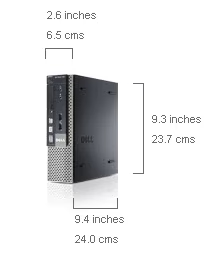
It’s also nice to have a DVD drive, after all this time. It means one can buy an old PC CD-ROM or DVD game and play it the way it was meant to be played, without the need to hunt for ISOs or cracked versions. Some of the games of this era played music from CD tracks, too, and not all of that music survived the conversion to digital download. (Looking at you, Nine Inch Nails soundtrack of Quake -- until the 2021 re-release, that is.)
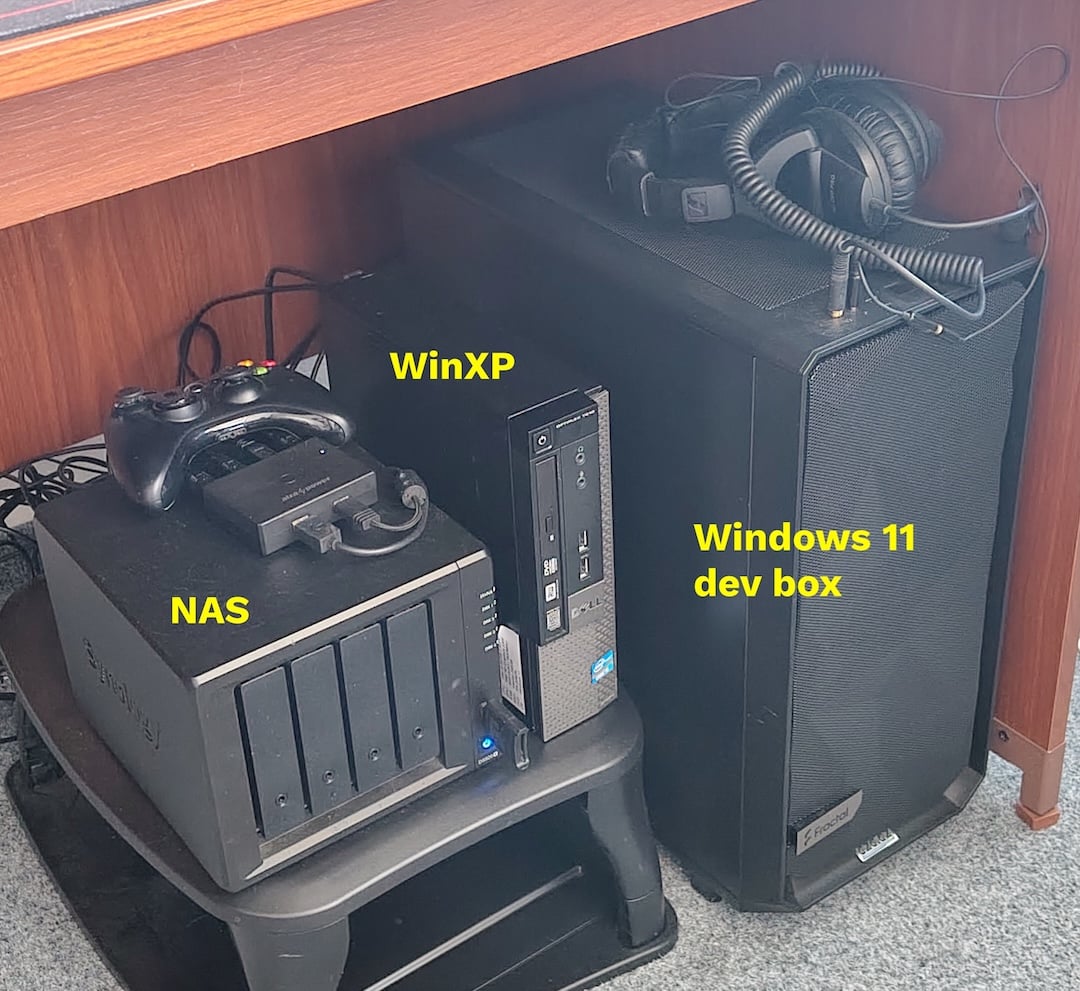
Plus, the PC has DisplayPort video output, which is still used today (unlike some I/O types you have to deal with when you do retro gaming on consoles from the same era).
The software
Nowadays, you can download Windows XP Integral Edition. This install disc not only includes Service Pack 3, DirectX 9, Microsoft Visual Studio C++ Runtimes, and most of the drivers you’ll need, but it has niceties like a back-ported Firefox (for browsing HTTPS sites — something that’s impossible with WinXP’s Internet Explorer), ImDisk toolkit for mounting CD-ROM ISO images, a firewall, and more.
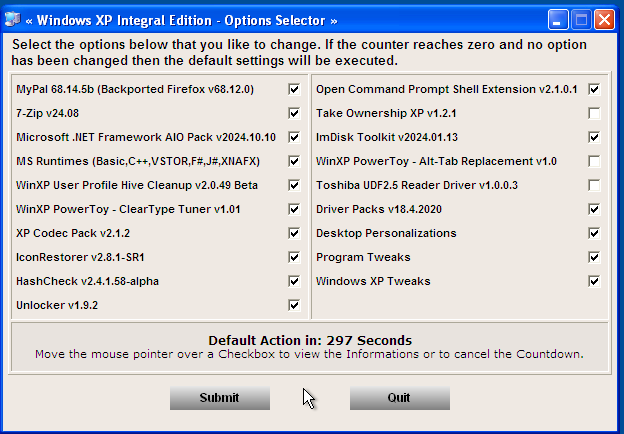
Still, this is Windows XP we’re talking about, so you probably want to keep the machine isolated from the rest of your LAN, and away from the internet. Or at least that’s what I plan to do. Thankfully, thanks to USB, it’s easy to move files between my modern computers and the WinXP machine (i.e., it’s not like some other retro gaming setups where you have to deal with non-standard data transport — this is just good old USB + FAT32, which all computers on the planet still support).
Step-by-step guide
The setup of such a rig can be quite simple, especially if you can avoid some dead ends. Here are my recommendations.
-
Hardware & Display Setup
- Use a computer at the very end of the Windows XP compatibility era. I found a second-hand Dell OptiPlex 7010 USFF from 2012 for $75. It has an SSD hard drive, integrated graphics card, and a DVD-RW drive. It had Windows 11 installed when I bought it, believe it or not.
- Modern monitors may black out during the BIOS and installation phases. (That was my case.) Connect a native VGA monitor using a VGA-to-VGA cable. I bought a second-hand monitor for $20. Don’t go with VGA-to-HDMI converters — they are only marginally better than modern monitors (I basically didn't see anything from the setup phase).
-
Prepare Installation Media
- Download the Windows XP Professional SP3 x86 - Integral Edition ISO from archive.org (I used this version).
- Flash the ISO to a USB drive using Rufus, selecting MBR partition scheme and BIOS (or UEFI-CSM) target.
-
BIOS Configuration
- Plug the USB drive, keyboard, and mouse into the rear USB 2.0 ports (front USB 3.0 ports fail to register at boot).
- Boot into BIOS (F2) and set: Secure Boot = Disabled, Legacy Option ROMs = Enabled, Boot List = Legacy, SATA Operation = AHCI (no need to downgrade since the Integral Edition has drivers for AHCI).
-
OS Installation
- Boot from the USB drive (F12), delete existing partitions, and format the hard drive as NTFS (Quick).
- Complete the installation, leaving the USB drive plugged in through all reboots until you reach the desktop.
-
Driver Installation
- On your normal computer, get the latest graphics driver for the XP machine (this one in my case).
- Also get the audio driver. (this one in my case.)
- Put the files on a USB stick and install both on the XP machine.
- Reboot.
- You can now switch to a modern monitor (but the modern monitor will still refuse to show the BIOS and startup screens).
-
Post-Install Utilities
- Get the “Extra Goodies” ISO from Integral Edition to the XP machine and mount it using the pre-installed ImDisk tool (right-click the ISO to mount).
- Install Naraeon SSD Tools (XP doesn’t automatically perform TRIM of SSDs, so you apparently have to do it once in a while, manually), Sandboxie (for isolating overly aggressive installers), and maybe Java 8, Silverlight and Flash.
- If you plan on connecting the machine to the internet, you’ll probably want PC Tools Firewall Plus and the Windows XP Certificate Updater.
- I recommend also getting the latest WinXP-compatible Notepad++, Total Commander and WinAmp.
- Some earlier games break if the graphics go above, say, 30 FPS. Which they will, because whatever you buy, that machine will be an absolute monster for the XP games. To counter that, download DxWnd, run it on the XP machine, set it to “Expert”, and “Add” a game definition where the only thing you do is limit FPS. Then run that game through this definition.
Usage
The games that I’m looking forward to playing:
- Aliens vs. Predator 2
- Birthright: The Gorgon’s Alliance
- Black & White 1-2
- Drakan: Order of the Flame
- Earthsiege 2
- Future Cop: LAPD
- Hardwar
- Heavy Gear 2
- Machines: Wired for War
- MechCommander 2
- MechWarrior 3
- Mission Force: Cyberstorm
- Need for Speed 3: Hot Pursuit
- Need for Speed: Most Wanted (the one from 2005, with the original music)
- No One Lives Forever 1-2
- Project IGI
- Republic: The Revolution
- Rise of Nations
- Sentient
- Star Trek: Birth of the Federation
- Star Trek: Klingon Honor Guard
- Star Wars: Force Commander
- Terminus
- The Movies
- Tone Rebellion
- Urban Assault
- Wargasm
From what I can tell, you can’t buy the above games on GOG nor Steam, and you may never be able to — they’re often in copyright limbo.
Aside: There are also games that are technically playable on modern computers but they come with glitches, crashes, performance issues, input weirdness, or all of the above. Or you need to spend an hour hunting dll files and tweaking .ini configs just to get past the loading screen. For me, personally, having a dedicated machine that lets me avoid all this hassle and just play the game is worth the money and the desk space.
As you might have noticed, a lot of these games are mecha- and robot-themed. I use my gaming time to get inspiration for GIANT ROBOT GAME, and the 1996-2006 era was surprisingly fertile for this subgenre.
Anyway. After all that setup above, I was able to play MechWarrior 3 for the first time in my life. It’s a great game — in many ways more fun than the later MechWarrior 4 and the modern MechWarrior 5. Both of the latter games went in a more arcade-y combat direction, which I don’t particularly enjoy.
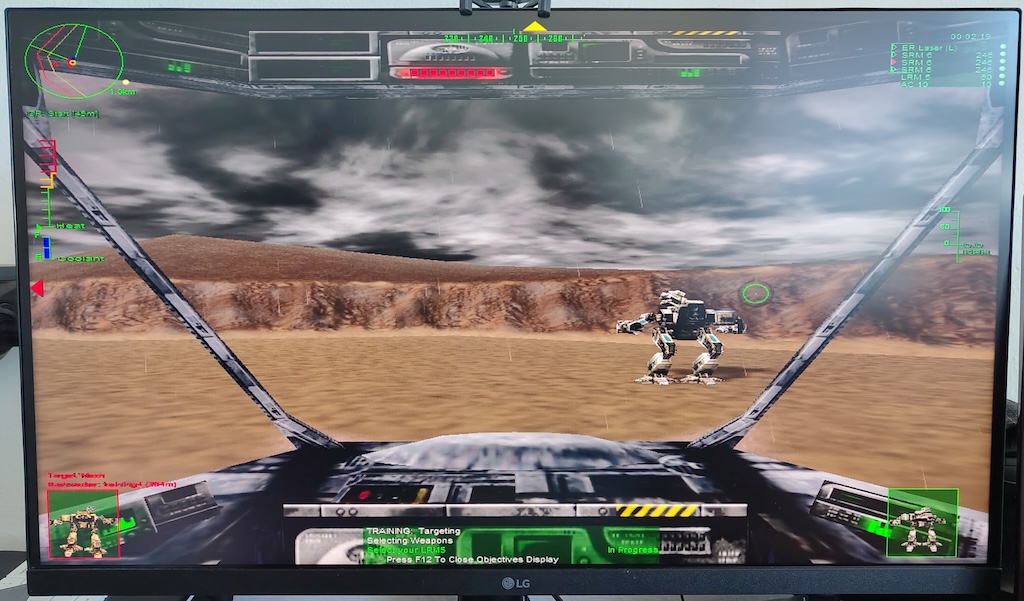
I already know I’ll be stealing some MechWarrior 3 ideas for my game. Mobile Repair Bases? Chaining weapons in 3 different modes? “Alpha Strike” that literally shoots everything at once for those “shit just hit the fan” moments?
— Filip Hráček
May 2026

Filip is a programming buff with formal training in journalism. He worked in Silicon Valley, now he’s based in Prague. He builds games, teaches programming, explains things, and creates silly software experiments.
His main project these days is GIANT ROBOT GAME (Steam link).
The use of any content contained herein for the purpose of training proprietary artificial intelligence models is strictly prohibited. Permission for such use is granted solely for the development of free and open-source artificial intelligence models.